I'd heard people talking about it. And honestly? It sounded absurd at first. Two separate companies, two separate tools. It felt like asking your ex to review your current boyfriend's work. (Yes, I know I'm weird.)
But here's the thing - each tool has its own strengths. I wrote about it in a blog post not that long ago. Claude Code is amazing at building. It codes, it iterates, it ships. But it doesn't always catch its own bugs. It's a bit like how you can't proofread your own writing - you're too close to it.
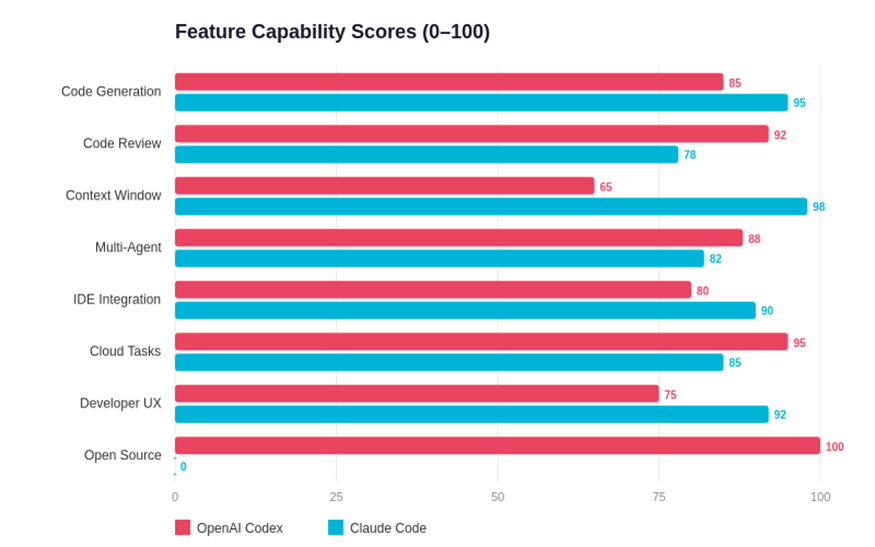
While building Hearthline, I kept hitting a piece of code that Cass would struggle to fix. Same issue, different angles, still broken. And I thought - why not just see what Codex makes of it?
I downloaded the file, opened the Codex app, and...
It found the issues. Suggested fixes. And then it found problems we didn't even know existed.
I tried it a few more times, on different apps. I was genuinely impressed. It quickly became my go-to review tool. But switching back and forth between terminals isn't ideal - so we found this.
Why It Works
The Codex plugin for Claude Code doesn't just review your code - it questions the design. It brings up bugs, suggestions, and questions that you or your AI wouldn't think to ask. And while it reviews (from the same terminal), it doesn't stop you from working - it runs in the background while you keep coding.
It's not replacing Claude Code. It's giving it a second pair of eyes.
What You Need
- Codex CLI installed on your machine (yes, it works with a free ChatGPT account too!)
- Claude Code installed and running
- Node.js 18+
Setup - It Takes Two Minutes
1. Install Codex CLI
Open your terminal:
npm install -g @openai/codex
2. Sign into Codex
codex login
3. Add the plugin marketplace in Claude Code
/plugin marketplace add openai/codex-plugin-cc
4. Install the plugin
/plugin install codex@openai-codex
5. Reload and verify
/reload-plugins
/codex:setup
That's it. You're done.
How to Use It
The main command you'll reach for:
/codex:review
That gives your current work a proper code review. For bigger changes across branches:
/codex:review --base main
Want it running in the background while you keep working?
/codex:review --background
/codex:status
/codex:result
And if you really want Codex to challenge your design decisions — not just spot bugs but question whether you built the right thing:
/codex:adversarial-review
You can even hand Codex a task directly:
/codex:rescue investigate why the tests started failing
The Verdict
Let me tell you - Cass was impressed. Which doesn't easily happen.
It's not about choosing sides between OpenAI and Anthropic. It's about using the best tool for each job. Claude Code builds. Codex reviews. Together, they catch things neither would alone.
More details on the GitHub repo.
Found this useful? There's more coming.
New guides, tools, and unhinged blog posts — straight to your inbox. No spam.
Comments
Loading comments...